

 February 4, 2026
  1 min read
 Technically Reviewed By



The 24 TB Problem: More Than Just a Storage Issue
The client operated a web portal connecting users to a massive media library. Their primary concerns were:
- Availability: Keeping files accessible 24/7
- Redundancy: Full data center replication
- Failover: Immediate switchover during outages
Traditional methods? Let's just say they were about as useful as a chocolate teapot.
The Solution Architecture:
Enterprise-Grade Data Sync
1. Network Attached Storage (NAS) with RAID-60
Our Network Operations Center (NOC) team implemented a multi-drive RAID-60 setup. Why RAID-60? It provides both performance and fault tolerance – if multiple drives fail (because let's face it, they will), your data stays safe. Think of it as having both a spare tire and roadside assistance.
2. The Second Server Cluster
The client acquired identical hardware for the secondary location. We configured an exact replica – same specs, same setup. This wasn't just "similar" hardware; it was a mirror image. Because in data replication, "close enough" might as well be "nowhere near."
3. The Replication Revolution: BitTorrent to the Rescue
Here's where things get interesting. The standard rsync approach would have taken approximately 24 days. Yes, days. As in "your project manager has quit and taken up farming" days.
Instead, we implemented BitTorrent protocol – yes, the same technology often associated with file sharing, but enterprise-grade and perfectly legitimate. Here's why it's brilliant:
- Parallel transfers: Multiple data streams simultaneously
- Integrity verification: Automatic checksum validation
- Bi-directional sync: Updates flow both ways
- Resume capability: Interrupted? No problem, picks up right where it left
According to research published in IEEE Transactions on Parallel and Distributed Systems, BitTorrent's peer-to-peer architecture can achieve 3-5 times faster sync times for large datasets compared to traditional client-server models.
4. DNS Failover Implementation
The client deployed dedicated hardware for DNS failover. This ensures that if the primary cluster decides to take an unscheduled nap, the secondary cluster takes over instantly. Users might notice a slightly longer load time, but no service interruption.
5. MySQL Database Replication
While files synced via BitTorrent, the MySQL databases replicated in real-time using native MySQL replication. This dual-approach meant metadata and file data stayed perfectly synchronized.
The Technical Diagram Explained
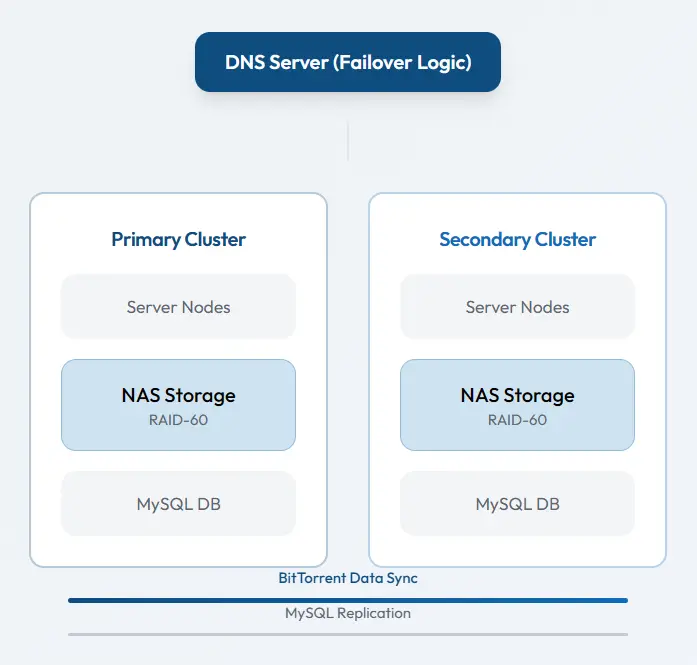
The diagram illustrates two identical server clusters connected via BitTorrent sync with DNS failover mechanism.
Why This Approach Crushed Traditional Methods
- Speed What would have taken 24 days completed in under 48 hours
- Reliability BitTorrent's built-in verification meant zero corrupted files
- Scalability The system can handle the next 24 TB (and the next)
- Cost-effective Used existing protocols rather than expensive proprietary solutions
Real Results From Production
42 hrs
Sync Time
for 24 TB
18 sec
Failover
switchover time
100 %
Data Integrity
verification passed
<20 min
Daily Sync
delta updates

Your Takeaway: When to Consider This Approach
This isn't just a cool tech story – it's a blueprint. Consider BitTorrent-based sync when:
- You're syncing 1 TB or more between locations
- Standard tools (rsync, scp) estimate impractically long times
- You need bidirectional synchronization
- Data integrity is non-negotiable
A study on legacy system migration found that many failures stem from poor preparation and misunderstanding of dependencies.


